Layered lock-screen wallpapers for Android, no complex editing
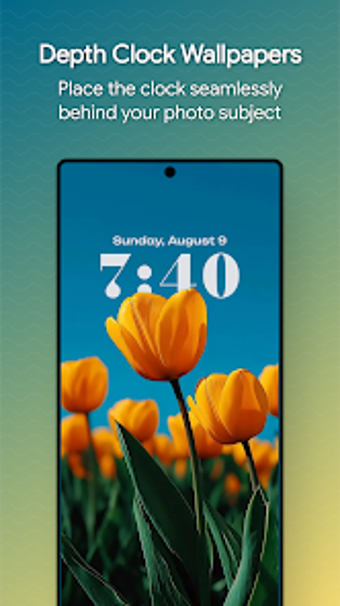
Depthly - Make Depth Wallpaper, by DrDisagree, creates layered wallpapers that position the system clock behind a photo’s subject to emulate a depth effect on Android. The tool centers on producing a lock-screen-like composition from a chosen image, exposing options for clock placement and presentation. It targets Android customization enthusiasts who want a layered look and finer control over how the clock sits within their wallpaper. The developer packages this as a straightforward personalization tool rather than a photo editor.
Automated subject extraction reduces manual masking work
Depthly uses AI-powered subject detection and extraction to automate foreground separation, a capability the developer highlights as the key step that avoids manual masking. The app produces high-resolution wallpaper files so detail remains on modern displays. That automated path converts a single photo into a layered composition without requiring separate image-editing tools, making the depth illusion accessible to people who do not want to hand-mask subjects.
Clock styling gives clear typography and color controls
The tool exposes extensive clock customization, including multiple fonts, color choices, and scalable sizes so type can match the photo’s tone. A real-time preview mode shows how type and placement interact with the layered subject, letting you check contrast and legibility before saving. These visual controls make it possible to test several typographic combinations quickly and refine presentation without leaving the app.
One-tap apply and a theming-focused developer background suit tinkerers
The app applies the finished composition with a one-tap process to keep daily setup brief. The developer is known for projects such as Iconify, which explains the emphasis on UI theming rather than photo-editing workflows. Community mentions and generally positive reception show it connects with people who customize devices regularly, so the workflow and scope align with hobbyist expectations rather than broad, casual use.
Depthly fits customization hobbyists who prefer focused personalization
Depthly suits Android users who tinker with visual details and want a layered lock-screen aesthetic, a position supported by the app’s design and community reception. Casual users who prefer simple system themes may find its niche focus unnecessary. Practical advice: test the effect with a few personal photos to confirm how clock placement and the layered illusion behave across different images before making it your daily wallpaper.